1. Click the Control Center icon in the taskbar ( upper right corner ), navigate to he "Sound" section, and select Crestron.


2. Now use the Media Volume on the Crestron touch panel to adjust the audio level.

3. If the above steps don't work, press Mute and then Unmute to reset audio.
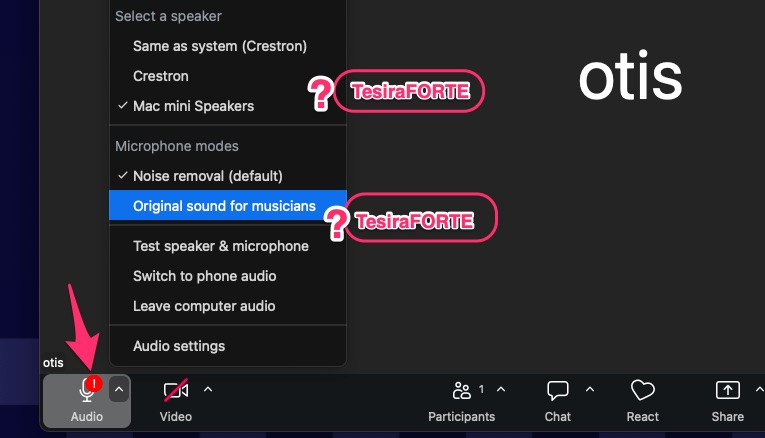
4. When using Zoom, make sure to select the correct speaker and microphone by clicking the upward-facing arrow next to the microphone icon.

IF the issue cannot be resolved, call 310-665-6825
Links
Fashion Theater Features
How to Set Up a Presentation at the Fashion Theater
🛠️ Troubleshooting
If you see an exclamation mark on the audio icon and TesiraFORTE is not listed under the microphone or speaker options, please restart the computer.
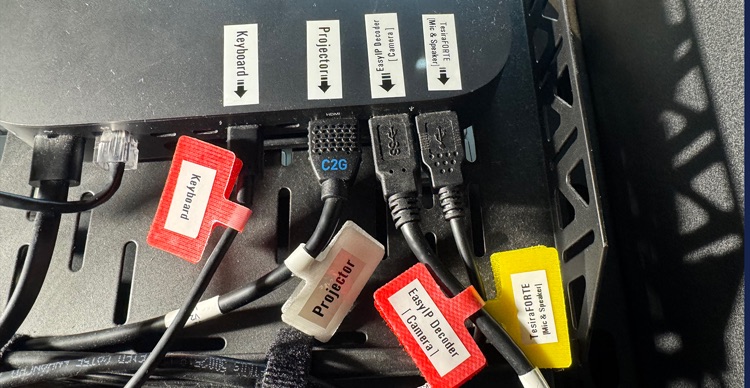
In case of a cable disconnection, please refer to the image below for guidance.